
Cuelith Italiano Download

Live projection software · free and open source

Live projection that starts light and grows with you.

Cuelith puts texts, lyrics and announcements on the projector, the stage monitor and every other screen. The core does a few things and does them well; you add the rest with plugins, only if you need it.

Version 0.2.0 · free · Windows and Linux

< 1%
of the processor with one slide on air
60 fps
on the outputs, with no dropped frames
0
accounts, cookies or tracking
100%
of releases pass automated tests on the real app

Processor and frame rate measured on a mid-range laptop with one slide on air.

Why Cuelith

Three choices, taken all the way

  1. Lightweight

    Install only what you use

    Out of the box, Cuelith is an essential tool: playlist, slides, preview, program and outputs. Songs, protocols and tools are plugins you switch on and off without restarting.

  2. Reliable

    The screen stays on

    Every plugin runs in its own separate space, with only the permissions it declares. If one stops responding, it is restarted automatically and the projection carries on. Your show is saved safely and recovered after a crash.

  3. Open

    Free, with no surprises

    The app is open source and needs no account. It works offline, and your shows, songs and images stay on your computer.

How you work

Built for the person at the desk, even working alone

Always see what is on air and what comes next

Playlist on the left, slides in the middle, program and preview on the right. One click prepares, one key goes live, with the fade you choose.

  • Five layouts: for presenting, for bands, for conferences
  • Keyboard shortcuts for everything: next, back, blackout, song sections
  • Timer and messages for the people on stage
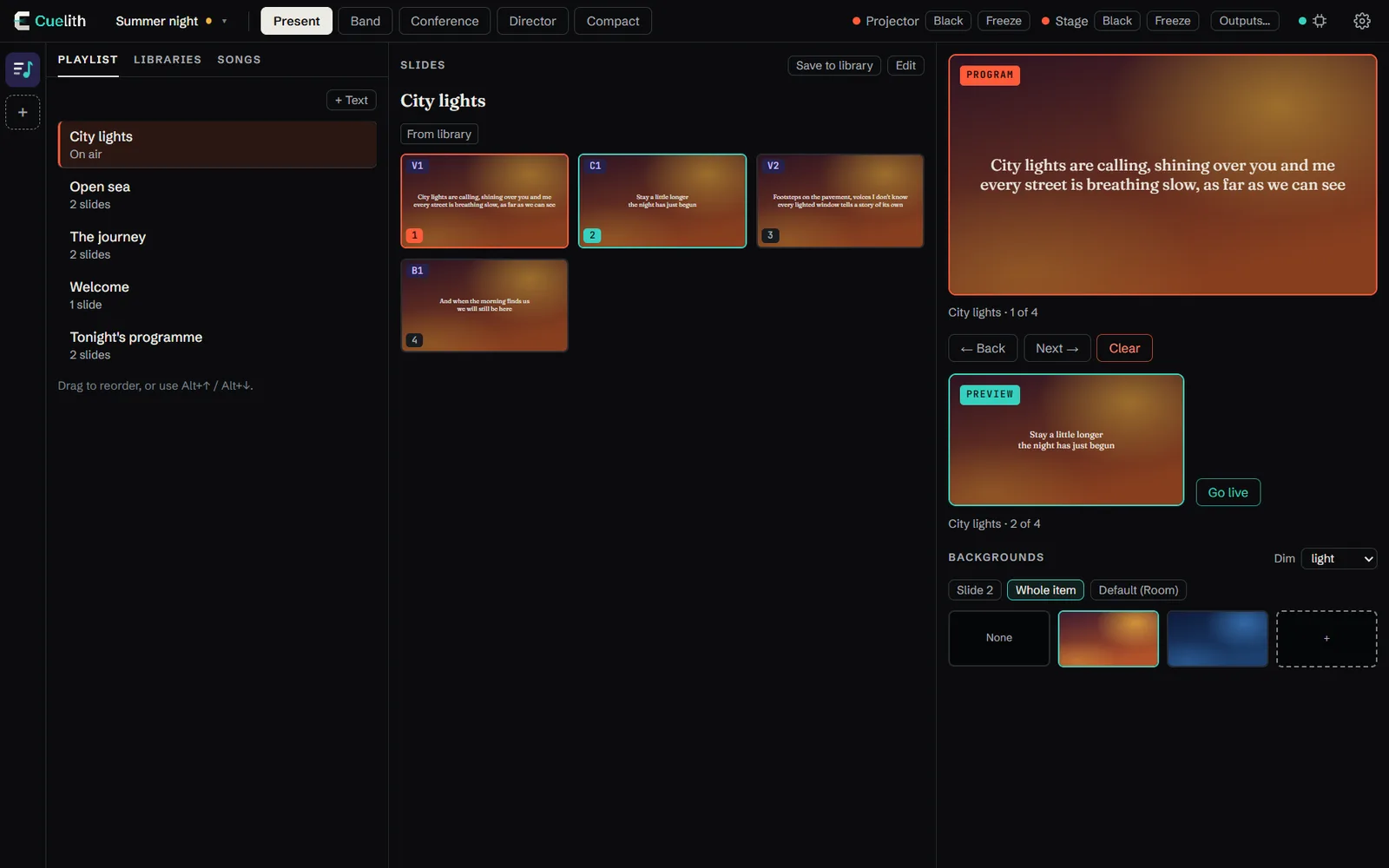
Cuelith control view with playlist, slides, program and preview.

One piece of content, a different screen for each audience

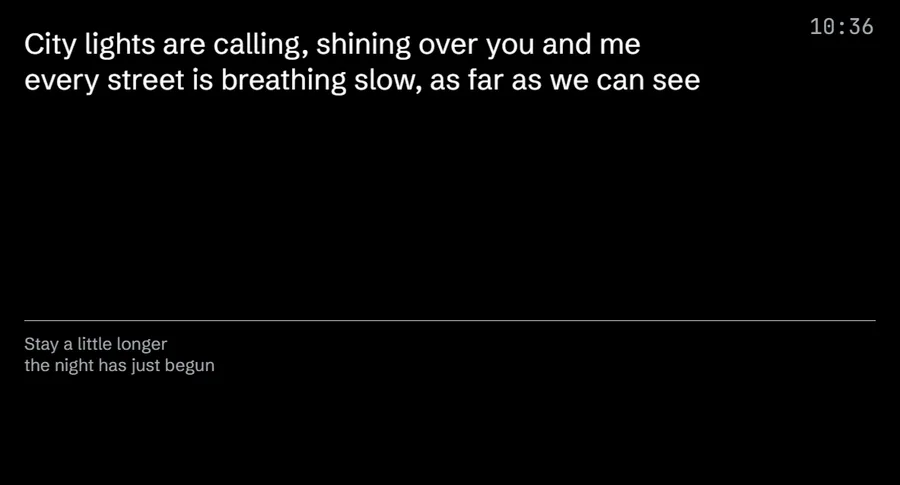
Press “Next” once. The room gets large text over the background; the stage gets the text, the next slide, the clock and messages from the desk.

  • As many outputs as your computer can connect
  • Blackout and freeze on a single output, leaving the others alone
  • Backgrounds per slide, per item or by default, with a dim layer for legibility
Two outputs with the same content: the room shows the text over a background, the stage shows the text with the next slide and the clock.

Songs with sections, ready for a band that improvises

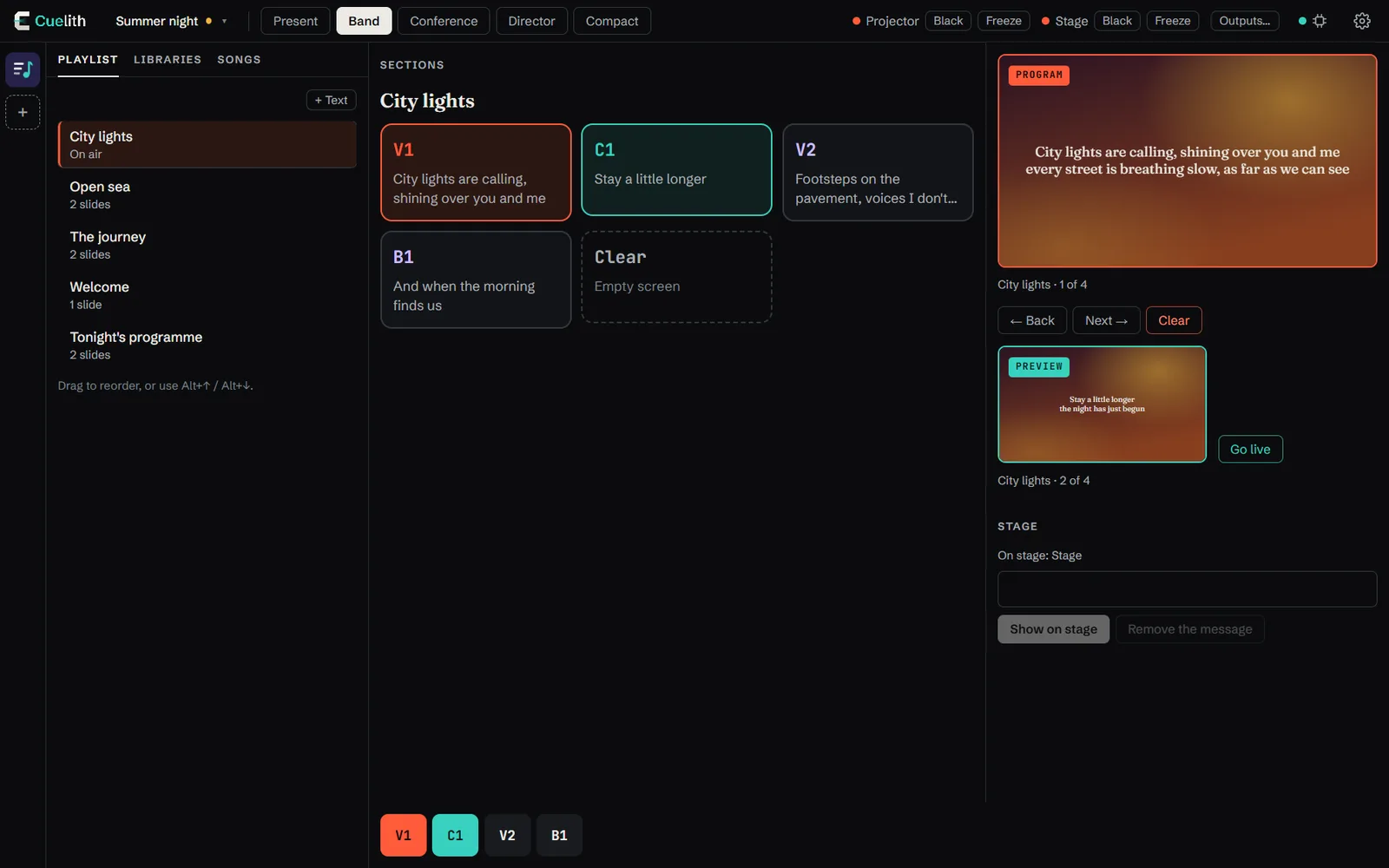
Verse, Chorus and Bridge become large buttons: when the band goes back to the chorus, you are there in one tap. Songs import and export in the open OpenLyrics and ChordPro formats.

  • Libraries searchable by title, lyrics, author and number
  • Projection order kept separate from the lyrics
  • Credits and authors always in place
Band layout: song sections as large buttons.

As a team, with tablet and phone

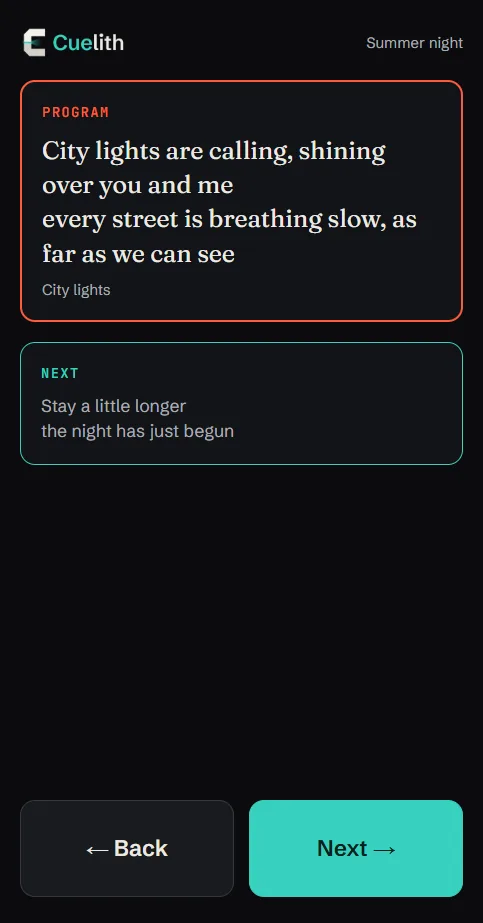
On the same network, a tablet becomes a second control desk and a phone becomes the speaker's remote. It opens in the browser, with nothing to install, and pairs with a code.

  • Different roles: operator, remote, view only
  • Works offline, on the venue network alone
  • Every device can be revoked with one click
The remote on a phone: slide on air, next slide, Back and Next.

Know in advance whether the computer can cope

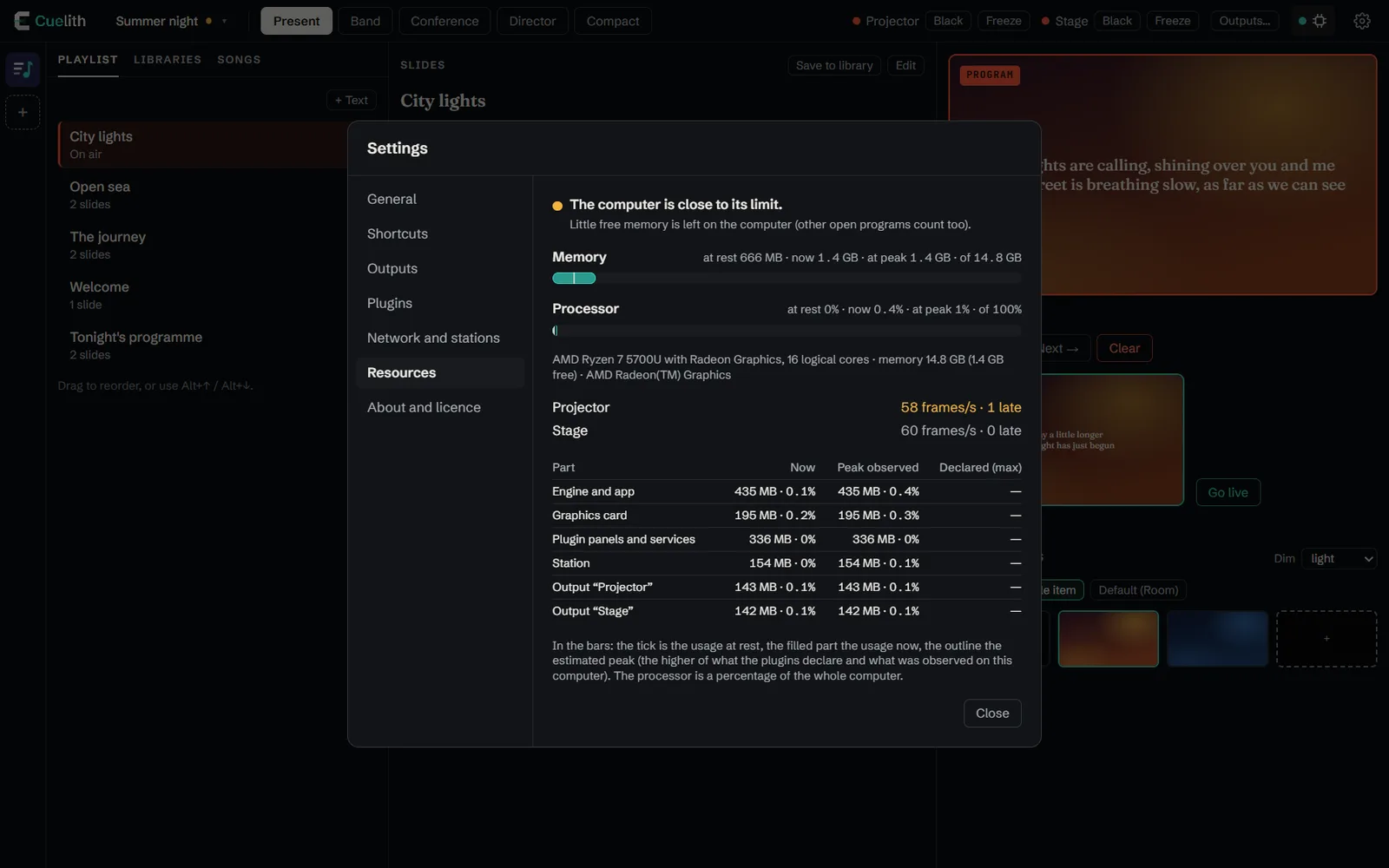
An indicator shows how much the app and the active plugins use, at rest, now and at peak, compared with what your computer actually has.

  • Frames per second for every output
  • Usage for every plugin, declared and measured
  • One colour to watch: green, yellow, red
Settings, Resources section: memory, processor and output frame rates.

Who it is for

It grows with your event

  • Available

    Conferences and schools

    A running order of talks, notes, a timer with time colours and messages to the speaker.

  • Available

    Concerts and bands

    Sections as buttons, projection order, lyrics and next slide on stage.

  • Available

    Churches and communities

    Songs with sections, announcements, texts and backgrounds. One monitor for the musicians and one for the speaker.

  • Coming

    Live streaming and events

    Camera, scenes, lower thirds and streaming will arrive as plugins, on the same app.

Plugins

The core does little. You choose the rest.

Every plugin installs from inside the app, declares what it can do before you switch it on, and can be turned off at any time. Some add a tool to the control view; others work in the background, like audio and video protocols.

What do you need?

Ready today

  • Songs

    Tool in the control view

    Available

    Songs with verses, choruses and a projection order. Imports and exports OpenLyrics and ChordPro.

    Permissions: Asks for no permissions: no internet, no files

    Version 0.5.0
  • Italian

    Language

    Included

    The Italian interface, already inside Cuelith.

  • English

    Language

    Included

    The English interface, already inside Cuelith.

Coming

Songs and texts

  • BibleTool in the control view

    Find a passage by reference or by words and send it on air. Multiple translations, extendable.

  • ChordsTool in the control view

    Chords above the lyrics on the musicians' monitor, with transposition.

  • Presentation importTool in the control view

    Bring presentations prepared with other programs into the playlist.

  • Audience questionsTool in the control view

    The audience writes from their phones, the desk chooses what to show.

Video and streaming

  • Lower thirdsTool in the control view

    Names and titles on screen, and lyrics as a lower band for streaming.

  • Camera and capture cardsWorks in the background

    Cameras and video inputs as sources, to combine with text and logo.

  • RTMP and SRT streamingWorks in the background

    Live streaming to the major platforms, while the room keeps the presentation alone.

  • RecordingWorks in the background

    Record what goes live, to a file.

  • NDIWorks in the background

    Video over the network, in and out, to mixers and other software.

  • Syphon and SpoutWorks in the background

    Share the picture with other software on the same computer, with no delay.

  • Projection mappingTool in the control view

    Fit the projection to surfaces and non-rectangular screens.

Audio

  • ASIO and CoreAudioWorks in the background

    Professional low-latency audio interfaces.

  • DanteWorks in the background

    Audio over the network to and from the venue mixer.

  • LTC timecodeWorks in the background

    Follow the clock of a synchronised show.

Control and lighting

  • MIDI and OSCWorks in the background

    Control Cuelith from foot pedals, controllers and other software, or let it control them.

  • DMX, Art-Net and sACNWorks in the background

    Lighting follows the playlist: a scene for every moment.

  • Button decks and APIWorks in the background

    Programmable physical buttons and commands from other venue systems.

Layouts

  • Worship layoutControl view layout

    Songs, Bible and announcements at hand, for a one-person team.

  • Broadcast layoutControl view layout

    Room and stream side by side, with scenes, audio and stream status.

  • Concert layoutControl view layout

    Layered clips and musical tempo, for concerts and club nights.

Coming plugins are planned, with no promised date. When they are released they appear here and in the app.

Download

Ready in two minutes

Free, with no sign-up. Updates arrive on their own and install only when you decide, never while you are on air.

Version 0.2.0 · 2 October 2026

Before you install

  • Windows may ask for confirmation on first launch, because the app is new and does not have a paid signature yet: choose “More info”, then “Run anyway”.
  • You do not need to be an administrator of the computer.
  • macOS is not available yet.
  • 8 GB of memory recommended. Integrated graphics are enough for text and images.
Download the source code (zip)

Versions

All versions

Every version stays available, with its notes.

0.2.0 Latest

Cuelith speaks English, and modules are now called plugins.

What is new

  • English interface, included in the app next to Italian. At first launch Cuelith follows the language of the computer.
  • Language choice in Settings → General: it changes at once, without restarting, for every station, and is kept at the next launch.
  • Plugins: what used to be called "modules" is now called plugins, throughout the app.
  • A plugin not yet translated into a language shows its texts in the language it has.
  • Songs 0.5.0 plugin, in English too.
  • The panel of a plugin you have just installed appears at once: on some computers the first opening stayed empty for about ten seconds.

Good to know

  • After updating, if you installed Songs 0.4 update it from the marketplace (Plugins → Marketplace → Update): the old version does not load with Cuelith 0.2.

Apache 2.0 licence.

0.1.0

First public version of Cuelith: the foundations. A lightweight core for projecting text on several screens, with everything else installable as a module.

This is a preview: it works and is tested automatically, but camera, scenes and live streaming are still missing (next phase).

Installation

  • Windows: download Cuelith-Setup-0.1.0.exe and open it. No administrator rights needed. On first launch Windows may show the "Windows protected your PC" notice because the installer is not signed: choose More info → Run anyway.
  • Linux: download Cuelith-0.1.0-x86_64.AppImage, make it executable and open it.
  • macOS is not available yet.

Updates arrive by themselves: Cuelith downloads them in the background and installs them only when you decide, never while you are on air.

What is included

  • Playlist, slides, preview and program, with fade and keyboard shortcuts for the operator.
  • Multiple outputs with different looks: Room (large text over a background) and Stage (text, next slide, clock, timer, messages). Black and freeze on a single output.
  • Image backgrounds per slide, per item or by default, with a dim layer for legibility.
  • Libraries with search, categories, codes and numbers; credits and backing tracks.
  • Five layouts of the control view: Present, Band, Conference, Director, Compact.
  • Modules: marketplace, install and update without restarting. Every module runs isolated with only the permissions it declares; if it stops, the outputs carry on. The Songs module is available (sections, projection order, OpenLyrics and ChordPro).
  • Stations on the local network: tablets and phones act as a control desk or a remote from the browser, paired with a code.
  • Resource meter: how much Cuelith and the modules use compared with the computer.
  • .cuelith files with safe saving, automatic copy and recovery after a crash.

Good to know

  • The connection of network stations is not encrypted: use it on a network you trust.
  • Background images stay in the computer's archive: when you copy a show to another computer they have to be added again.
  • Interface in Italian; other languages will arrive as modules.

Apache 2.0 licence.

FAQ

Frequently asked questions

Is it really free?

Yes. The app is open source and will stay free, along with everything you need to use it. Today all plugins are free too.

Will there be paid plugins?

In the future some advanced plugins may have a price, which we intend to keep low. That will not apply to anything essential for using Cuelith: the app and its core features stay free. If it happens, we will say so clearly beforehand.

Does it work offline?

Yes. The internet is only needed to download updates and new plugins. During an event Cuelith does not need it, not even for devices on the local network.

Can I use it for live streaming?

Not yet. Today Cuelith projects texts, songs and images on multiple screens. Camera, scenes and streaming are the next planned plugins.

Where does my data go?

It stays on your computer. Cuelith has no accounts and sends no personal data or content. It connects to the internet only to check for updates and read the list of plugins.

I already have my songs. Can I import them?

Yes, if they are in the open OpenLyrics or ChordPro formats, or as plain text. You can also export them all at once, as a backup.

What computer do I need?

Windows 10 or 11, or Linux, 64-bit. With one slide on air Cuelith uses about 600 MB of memory; each extra output adds about 120. The app itself shows you how much it is using.

Which languages is the app available in?

English and Italian, both included. At first launch Cuelith follows the language of your computer, and you can change it in Settings → General. More languages will arrive as plugins.

What happens if a plugin has a problem?

It is closed and restarted automatically, while the projection carries on. If it stops several times in a row it stays off and tells you.